Financial Services Cloud Managed Package Vs Standard Features
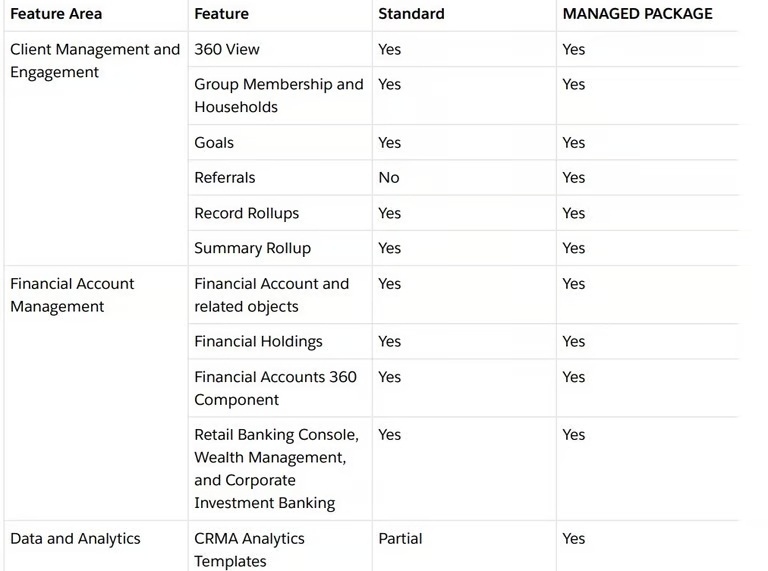
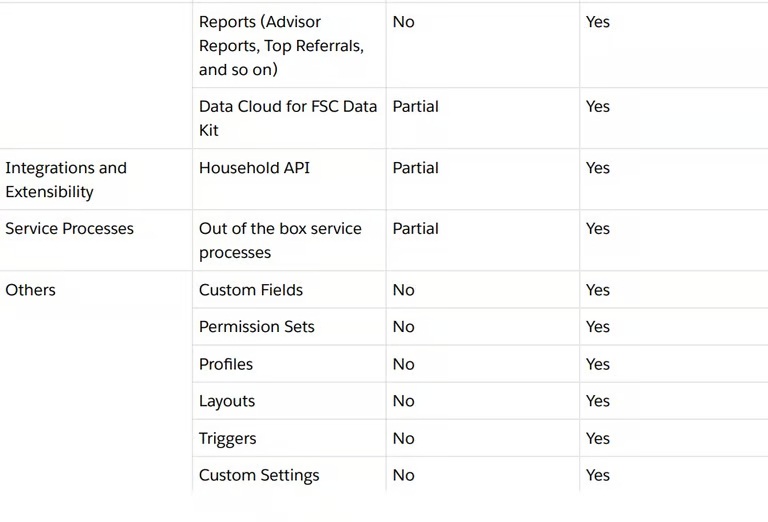
The table lists the Financial Services Cloud features and indicates if a feature is available only in the managed package or is available only as a standard feature or both.
FINANCIAL SERVICES CLOUD
SaasPointIndia 1 min read
What Each Approach Means
Managed Package
FSC originally shipped (and many existing customers still use) a managed package. This is an installable collection of metadata (custom objects, fields, layouts, etc.) that extends the standard Salesforce CRM platform with financial-services-specific models and features.
It uses a namespace (e.g., “FinServ__”) and custom objects such as FinServ__FinancialAccount__c etc.
The managed package must be installed, and updates must often be pushed by Salesforce (or the package manager).
Limitations: Because it is separate from the core platform model, there are some constraints (e.g., fewer customization options on the packaged objects/fields, namespace dependency, upgrade/maintenance overhead).
Standard Features / Core Platform Model
More recently, Salesforce has been moving many FSC features into the standard platform (core objects, no separate package necessary) — meaning you use native Salesforce objects and enhancements built for financial services.
The documentation says: “Currently, the majority of the Financial Services Cloud features are available on the standard platform and don’t require the managed package to be installed.”
For new implementations, Salesforce recommends using the standard data model unless you have a compelling reason to use the managed package.
Managed Package vs Standard Features
Here’s a breakdown of how they compare across various dimensions:
| Feature / Consideration | Managed Package | Standard Features (Core Platform) |
|---|---|---|
| Installation & upgrade overhead | Must install the package; upgrades may require coordinated efforts. | Built-into platform or requiring minimal install; upgrades follow Salesforce release cycle more directly. |
| Namespace / custom objects | Uses namespace, custom objects (FinServ__…) and packaged fields. | Uses standard objects (no separate namespace) or newly introduced FSC standard objects. |
| Customisation flexibility | Some restrictions: cannot always rename packaged fields, or easily change field types, etc. Example: one user noted rename constraints. | More standard Salesforce flexibility; you can customise native objects/fields more freely. |
| Alignment with Salesforce innovation | Because it is packaged, sometimes features arrive later or require separate package upgrade. | Using standard features means better alignment with Salesforce’s platform roadmap, faster access to new capabilities. |
| Technical debts / mixing models | If mixed (some objects in package, some standard) you risk complexity, confusion, duplicates. The community warns: “you need to pick one and stick with it”. | If you pick standard model early, you avoid namespace/package technical debt and reduce migration risk later. |
| Migration / transition costs | Those already on the managed package may face migration costs if they want to move to standard objects. | New implementations using standard features avoid the migration overhead; fewer “legacy package” issues. |
| Long-term roadmap | Managed package remains supported currently, but Salesforce is emphasising standard model for new development. | Standard model is the future direction: more investing of resources, less package-centric overhead. |
When to Choose Each Approach
Choose Managed Package When
You already have a large implementation using the managed package and migrating would be costly or risky.
You need a specific packaged feature that only exists (or works better) in the managed package version.
You’re fine with handling package upgrades and limited customization flexibility.
Choose Standard Features When
You are starting fresh and want to align with Salesforce’s future direction.
You want flexibility, fewer upgrade hassles, and faster access to innovations.
You prefer to avoid namespace complexity and keep your data model simple.
You plan to stay long-term and want to avoid migration or technical debt later.
Best Practices for Implementation
Since you’re involved in development or architecture (especially for integrations or back-end systems), here are key recommendations:
Avoid mixing: Don’t use both models for the same data (e.g., FinancialAccount in managed vs standard).
Map your integrations: Verify object names and prefixes before integrating external systems.
Validate customization constraints: If using managed package, test early if field changes meet your needs.
Plan for the future: Even if you use managed now, monitor Salesforce’s roadmap and plan migration options.
Focus on core data alignment: Understand new standard objects like Financial Account Balance or Statement.
Ensure reporting compatibility: Standard model stores some data in related child objects rather than fields.
Upgrade strategy: For managed package, always test upgrades in sandbox first.
Document & govern: Record which model you use, update your team and integration code accordingly